
auto door locking question

Davenorton

Badlands
Well-Known Member
First Name
Dave
Joined
Mar 20, 2021
Threads
3
Messages
55
Reaction score
126
Location
Saratoga Springs NY
Vehicle(s)
21 BadLands/Badlands trim Black over rapid red.
I park in a locked garage. I leave my keys hidden in the sport. I don't lock the car when I leave. From time to time , returning to the car, I find the drivers door only locked. I have to walk to the passenger side to hit the unlock button. Thoughts? I would like it to stop. Out driving I always use the fob to lock/unlock. All doors respond correctly.
Sponsored


 

Dude

Badlands
Well-Known Member
Joined
Sep 20, 2022
Threads
108
Messages
4,316
Reaction score
4,968
Location
Arizona
Vehicle(s)
2022 Bronco Sport Badlands
First thing to confirm, under Settings on the 8ā€ Display locate the setting for door (locking) - I think is under Vehicle tab - see if you have it set to lock only drivers door or if it’s set to lock/unlock all 4 doors

Probably is set to lock only drivers door but this setting might provide a clue

next, how can you be sure only drivers door is unlocked? You said ā€œā€¦I find the drivers door only locked. I have to walk to the passenger side to hit the unlock button.ā€ - because touching the unlock sensor on the front passenger side exterior door handle will unlock at least the front passenger door (and the other 3 doors depending on the Setting)

Did you check the rear doors if they are locked or unlocked when you find the drivers door is locked?

Finally, are you sure you are not hitting the driver doors (exterior) lock sensor when you close the drivers door and are you sure you aren’t accidentally hitting the lock button on the inside of the drivers door as you are exiting the vehicle - often that is the case for other owners

however leaving the keyfob inside the vehicle and not in an RFID protected pouch implies the vehicle will not allow doors to remain locked when a keyfob is inside the vehicle and not in an RFID holder

There are other possibilities involving the 2nd keyfob, FordPass App, low battery in the keyfob left inside the vehicle, and other scenarios
 
Last edited:

<<<synthpulse>>>

Badlands
Well-Known Member
First Name
Brian
Joined
Dec 30, 2023
Threads
1
Messages
48
Reaction score
89
Location
Washington State, USA
Vehicle(s)
1998 Lincoln Mark VIII, 2012 Acura TSX Sport Wagon
My BS does the same thing. If I leave the car to run back into the house to get the things I always forget to bring (usually my wallet), when I come back to the Bronco, I'm locked out the driver's side. It's annoying.
There are no specific door lock settings on my 2021 BSBL. In Settings/Locks, the only thing related to this is "Intelligent Access", which is basically to (or not) use your key fob to unlock instead of a key.
 
Last edited:

Sue

Outer Banks
Member
First Name
Sue
Joined
May 31, 2024
Threads
4
Messages
9
Reaction score
9
Location
St Charles, MO
Vehicle(s)
2024 Ford Bronco Sport
I have this exact problem. I usually use my Ford Pass app to open it, but if my phone is in the car, I play mountain goat in the crowded garage. If I remember, I hit the unlock button, on the door (while it’s open) twice before shutting it. That usually works.
 

Dude

Badlands
Well-Known Member
Joined
Sep 20, 2022
Threads
108
Messages
4,316
Reaction score
4,968
Location
Arizona
Vehicle(s)
2022 Bronco Sport Badlands
My BS does the same thing. If I leave the car to run back into the house to get the things I always forget to bring (usually my wallet), when I come back to the Bronco, I'm locked out the driver's side. It's annoying.
There are no specific door lock settings on my 2021 BSBL. In Settings/Locks, the only thing related to this is "Intelligent Access", which is basically to (or not) use your key fob to unlock instead of a key.
Are you leaving the vehicle running or shut off when you run back into the house and does it matter if there are other people in the vehicle or not?

Please confirm, under Settings on the 8ā€ Display .. the setting for door (locking) - I think is under Vehicle tab - see if you have it set to lock only drivers door or if it’s set to lock/unlock all 4 doors

If you are leaving the vehicle with the vehicle off when you go back to the house, and the keyfob is not left in the vehicle, the most likely cause of finding the drivers door locked upon return is one of these two things:

1. you touch the driver doors (exterior) lock sensor when you close the drivers door
2. you accidentally hit the lock button on the inside of the drivers door as you are exiting the vehicle
Often one of these is the case for other owners.

Ford Bronco Sport auto door locking question IMG_4746


<<<synthpulse>>>

Badlands
Well-Known Member
First Name
Brian
Joined
Dec 30, 2023
Threads
1
Messages
48
Reaction score
89
Location
Washington State, USA
Vehicle(s)
1998 Lincoln Mark VIII, 2012 Acura TSX Sport Wagon
First thing to confirm, under Settings on the 8ā€ Display locate the setting for door (locking) - I think is under Vehicle tab - see if you have it set to lock only drivers door or if it’s set to lock/unlock all 4 doors

Probably is set to lock only drivers door but this setting might provide a clue

next, how can you be sure only drivers door is unlocked? You said ā€œā€¦I find the drivers door only locked. I have to walk to the passenger side to hit the unlock button.ā€ - because touching the unlock sensor on the front passenger side exterior door handle will unlock at least the front passenger door (and the other 3 doors depending on the Setting)

Did you check the rear doors if they are locked or unlocked when you find the drivers door is locked?

Finally, are you sure you are not hitting the driver doors (exterior) lock sensor when you close the drivers door and are you sure you aren’t accidentally hitting the lock button on the inside of the drivers door as you are exiting the vehicle - often that is the case for other owners

however leaving the keyfob inside the vehicle and not in an RFID protected pouch implies the vehicle will not allow doors to remain locked when a keyfob is inside the vehicle and not in an RFID holder

There are other possibilities involving the 2nd keyfob, FordPass App, low battery in the keyfob left inside the vehicle, and other scenarios
 

<<<synthpulse>>>

Badlands
Well-Known Member
First Name
Brian
Joined
Dec 30, 2023
Threads
1
Messages
48
Reaction score
89
Location
Washington State, USA
Vehicle(s)
1998 Lincoln Mark VIII, 2012 Acura TSX Sport Wagon
This has happened since day one of owning this car. I have tried all your suggestions previously, of course: Car off. All doors unlocked. No other key fobs near the car. Not hitting the LOCK button on the door upon egress (duh). No grandkids in the car ;) And, to your point, WTH would Ford engineer their cars with the ability (via Settings) to only make one door lock? I understand that you're trying to help diagnose this quirk. Thank you.

How about this scenario: Ford implemented this "feature" so that would-be theives would have enter on the passenger side, as a carjacking deterrent. Nothing like a little inconvenience to stop theft. Seriously though, I have learned to live with this odd behavior. It's part of the BS charm.
 

<<<synthpulse>>>

Badlands
Well-Known Member
First Name
Brian
Joined
Dec 30, 2023
Threads
1
Messages
48
Reaction score
89
Location
Washington State, USA
Vehicle(s)
1998 Lincoln Mark VIII, 2012 Acura TSX Sport Wagon
Saw you replied but didn’t see any specifics just a repost of my message?
Sorry. Haphazardly multitasking. iPad is sensitive to inadvertent touches.
 

Dude

Badlands
Well-Known Member
Joined
Sep 20, 2022
Threads
108
Messages
4,316
Reaction score
4,968
Location
Arizona
Vehicle(s)
2022 Bronco Sport Badlands
This has happened since day one of owning this car. I have tried all your suggestions previously, of course: Car off. All doors unlocked. No other key fobs near the car. Not hitting the LOCK button on the door upon egress (duh). No grandkids in the car ;) And, to your point, WTH would Ford engineer their cars with the ability (via Settings) to only make one door lock? I understand that you're trying to help diagnose this quirk. Thank you.
How about this scenario: Ford implemented this "feature" so that would-be theives would have enter on the passenger side, as a carjacking deterrent. Nothing like a little inconvenience to stop theft. Seriously though, I have learned to live with this odd behavior. It's part of the BS charm.
Interesting response, besides the iPad, the driver doors (exterior) lock sensor is also sensitive to inadvertent touches!!

Regarding your question on why would would Ford engineer their cars with the ability (via Settings) to only make one door lock or all 4 doors lock is one of those ā€œit is what it isā€ kinds of things

My post only indicated there are 2 ways which I will repeat again, one is inside the vehicle and one is on the outside of the drivers door:

Sorry to repeat these:

1. you touch the driver doors (exterior) lock sensor when you close the drivers door

2. you accidentally hit the lock button on the inside of the drivers door as you are exiting the vehicle

It is super easy to inadvertently touch the lock sensor when you close the drivers door, the lock sensor is on the exterior of the drivers door on the door handle - I had the same problem as you and i finally solved that by never touching the drivers side exterior door handle unless I am 100% sure I want to lock or unlock all 4 doors - and I do have my setting enabled to always lock/unlock all 4 doors

I’m sorry to repeat but your response of ā€œNot hitting the LOCK button on the door upon egress (duh)ā€ didn’t state for sure you are not hitting the lock button on the inside of the drivers door nor are you not touching the lock sensor on the exterior drivers door handle. There are those two ways but you answered for just one way.

Also … it is germane if you wanted to solve the drivers door lock issue you’ve always had - to know if you have the setting enabled to always lock/unlock all 4 door or just the drivers door.

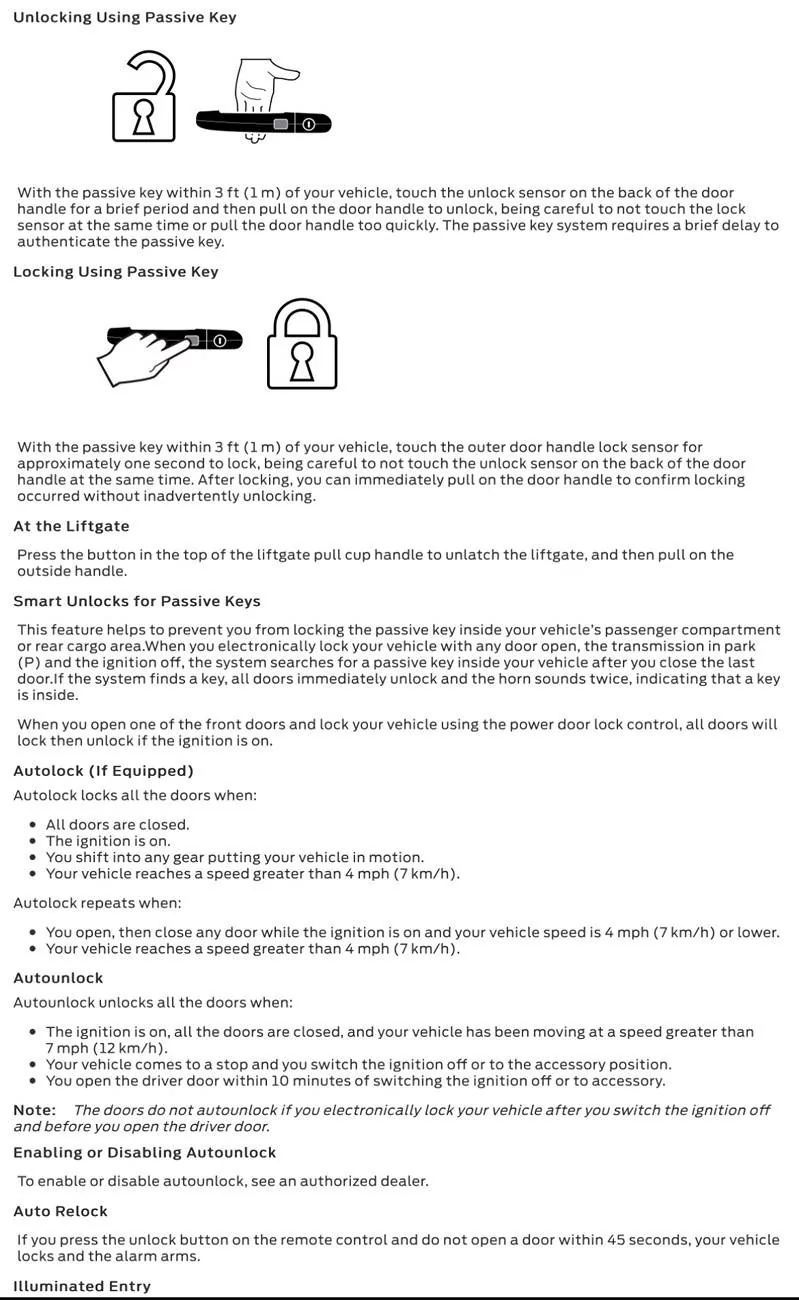
There is only one ā€œauto lockā€ scenario described in the Owners Manual per the pic in Post #5 - which requires the vehicle to be moving > 7mph. (This is not your case)

And there does seem to be a valid case where the vehicle is left running with the keyfob inside the vehicle and the driver exists the vehicle closing the drivers door (and not touching either of the two lock methods described above) - for an auto lock to occur - this is not in the owners manual but it’s not the case you describe anyway.
 

Mark S.

Badlands
Well-Known Member
First Name
Mark
Joined
Oct 30, 2021
Threads
119
Messages
6,733
Reaction score
13,150
Location
St. Jacob, IL
Vehicle(s)
2021 Badlands | 2020 Escape
There have been a few anomalies reported with the door locks on these vehicles. This is the first time I've heard of this one. I've heard about the issues with intelligent access not working with the liftgate. That's usually resolved by locking all the doors with the fob, then unlocking the liftgate with the fob.

I think there must be some if/then logic in the intelligent access software that gets out of whack. Given that only the driver's door is affected, I suspect it has something to do with the one- and two-stage unlock options. With two-stage unlock selected only the driver's door unlocks when you press the unlock button. To unlock the remaining doors you have to press the unlock button twice. One-stage unlock unlocks all doors with a single press of the unlock button.

I realize your problem has to do with the door spontaneously locking, but I think you should try switching between one- and two-stage unlocking. Here's how to do it (from your owner's manual):

To change between driver door or all door
unlock mode, with the ignition off, press
and hold both the lock and unlock buttons
on the remote control for three seconds to
change between driver door or all door
unlock mode. The direction indicators
flash twice to indicate a change to the
unlocking mode. Driver door mode only
unlocks the driver door when you press the
unlock button once. All door mode unlocks
all doors when you press the unlock button
once. The unlocking mode applies to the
remote control, keyless entry keypad and
intelligent access.


Dude

Badlands
Well-Known Member
Joined
Sep 20, 2022
Threads
108
Messages
4,316
Reaction score
4,968
Location
Arizona
Vehicle(s)
2022 Bronco Sport Badlands
.. Given that only the driver's door is affected, I suspect it has something to do with the one- and two-stage unlock options

With two-stage unlock selected only the driver's door unlocks when you press the unlock button

One-stage unlock unlocks all doors with a single press of the unlock button

I realize your problem has to do with the door spontaneously locking…
Using Mark’s procedure, performing the suggested switching could solve a getting out of whack issue or could at least give the illusion of solving the issue because it doesn’t happen every time to owners that reported the issue and will give them hope that the problem is resolved for at least some amount of time

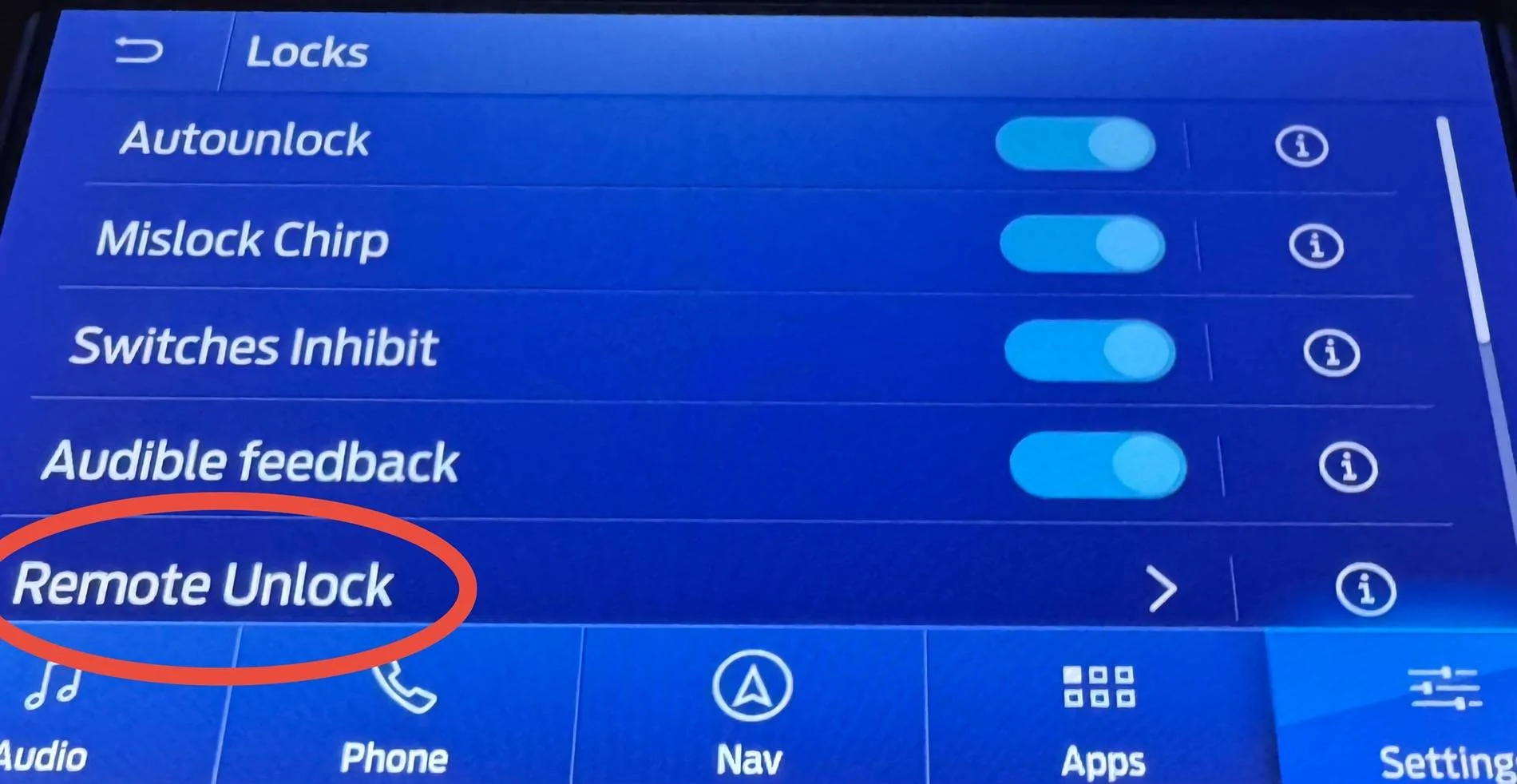
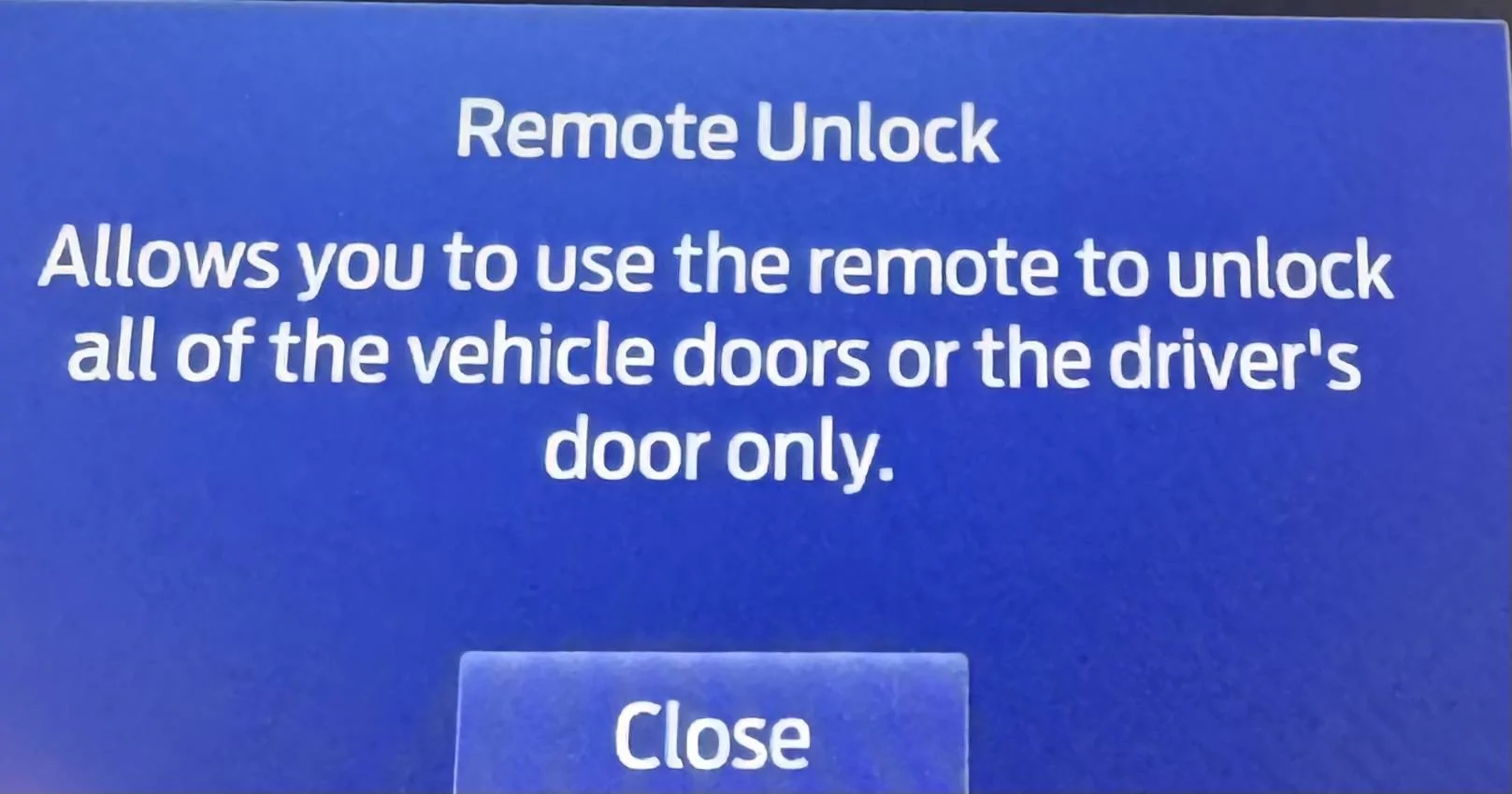
under Settibgs -> Vehicle -> Locks is this screen, pressing Remote Unlock allows all of the vehicle doors or drivers door only to be unlocked (this one-time setting would not be like the procedure Mark listed but does allow the option to be selected one-time)

My guess is most owners that experience the drivers door locked phenomenon, shut off the vehicle, exit the vehicle then are inadvertently touching the sensor on the exterior drivers side door handle when closing the drivers side door then returning to the vehicle and finding just the drivers door locked

but that’s just a guess based on interactions with at least a dozen owners both on this Forum and on Fb Bronco Sport groups that experienced the phantom drivers door spontaneously locking issue

If it happens to you, you are not alone


Ford Bronco Sport auto door locking question IMG_4747


Ford Bronco Sport auto door locking question IMG_4748
 
Last edited:

Dude

Badlands
Well-Known Member
Joined
Sep 20, 2022
Threads
108
Messages
4,316
Reaction score
4,968
Location
Arizona
Vehicle(s)
2022 Bronco Sport Badlands
Also on the above Locks screen is the Intelligent Access feature - an owner experiencing the phantom drivers door lock issue can disable the sensors on the drivers side door handle - if the phantom drivers door lock issue does not reoccur (allow a long enough period of time) when Intelligent Access feature is turned off, the owner can then reasonable assume the issue was caused by inadvertently touching the sensor locking the drivers door
 

Dannyp56

Outer Banks
Well-Known Member
First Name
Danny
Joined
Jul 10, 2024
Threads
2
Messages
186
Reaction score
220
Location
Payson, AZ
Vehicle(s)
2024 Ford Bronco Sport
I use the button on the door to lock it when I go shopping. I don't know how to open the rear hatch other than unlocking using the key fob. I like the unlock feature with the key fob in my pocket.
Sponsored


Top